Today you will use Powerpoint to compile the poetry which you have written this year into a digital anthology. Use one slide per poem, including the type of poetry it represents in the heading. Create a slide for the title page and an About The Author slide containing your picture. Choose a background that goes well with each slide, and be creative with your presentation. Also, the slide show should advance on a click with the same transition between each slide.
Posted on on March 20th, 2009 in
Assignments 08-09 |
1 Comment »
Today you will create an acrostic poem about yourself, using strong adjectives, in Powerpoint. Choose a vertical Word Art for your name. Use a text box for the adjective. You and a partner will work on taking a picture of your profile in Photobooth. You will insert the picture into your Powerpoint slide and use the drawing tools to trace around your profile. Choose your favorite colors for the fill and drop a shadow on the object.

Posted on on March 19th, 2009 in
Assignments 08-09 |
No Comments »
We will use the drawing component of Appleworks to create a minibook of six types of figurative language: simile, metaphor, personification, alliteration, onomatopoeia, and hyperbole. Use one page for each. Give a definition, an example, and add a mini picture to the page. Create a colorful front cover with a title and your name.
Use the following website to help you complete your book.
Brainpop Similes and Metaphors
Figurative Language
Poetry As We See It
Paint by Idioms
Posted on on January 23rd, 2009 in
Assignments 08-09 |
No Comments »
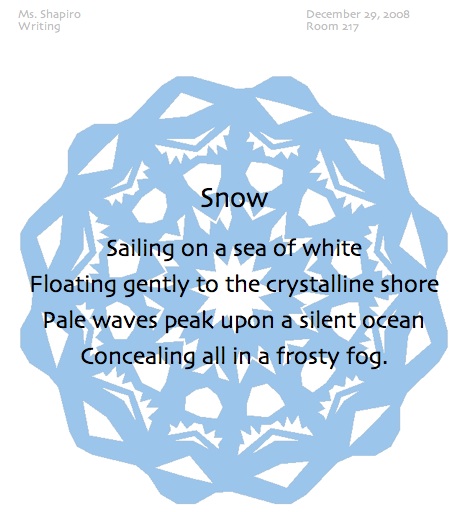
We will put your new keyboarding skills to work today by keying in your Winter Poem. First, we will learn how to put a school heading on your page using the Header portion of Word. You will learn how to center a title, use the spelling and grammar check, edit the font, and add a picture. You will create a snowflake at Make-A-Flake and insert it into your poem, behind the text.

Posted on on December 29th, 2008 in
Assignments 08-09 |
No Comments »
Today you will use PowerPoint to key in your cinquain poem. These poems will be used to create a class VoiceThread. Use a different Word Art style for each line of your poem, trying to match the form to your words. You may choose a very subtle background for your poem, one that does not distract from the Word Art style. Finally, you will create an avatar to represent YOU on the VoiceThread!

Posted on on December 10th, 2008 in
Assignments 08-09 |
2 Comments »
Mrs. Leary will lead you in computer lab today as you use Microsoft Word to key in your Thanksgiving Couplet Poems. Remember to use a Header for your school heading, center your title with Alignment and Spacing, use Spelling and Grammar check, format the font, and add a picture.
Posted on on November 17th, 2008 in
Assignments 08-09 |
No Comments »
Today you will key in your Thanksgiving senses poem. We will learn how to use the Header, use Alignment and Spacing, format the font, spell and grammar check, add a picture and put a border on your page.
If you are done early, visit The First Thanksgiving.

Posted on on November 7th, 2008 in
Assignments 08-09 |
No Comments »
Today you will key in your poem, If I Were In Charge Of The World, based on the poem by Judith Viorst. We will review some of the formatting and editing techniques in Microsoft Word. We will learn how to change fonts and sizes, use Alignment and Spacing, Spelling and Grammar check, Insert a Picture from a file, and use Borders. We will use Photobooth to take a picture of yourself for the project. You will save your document as World, and print to the lab printer.
Posted on on October 3rd, 2008 in
Assignments 08-09 |
No Comments »
Today you will learn how to use Photobooth to take a picture of yourself and how to insert that picture into your Bio Poem. You also will learn how to place a border around the page of a Word document. Finally you will print the finished product for Open House.
Posted on on September 15th, 2008 in
Assignments 08-09 |
Comments Off
Today we will review some of the formatting and editing features of Microsoft Word so that you can type the Bio Poem. We will focus on formatting fonts and spelling and grammar check. Please go to the dock, click on the icon for Word, and click Open to create a blank document in Word.
Posted on on September 14th, 2008 in
Assignments 08-09 |
Comments Off