Now that we finished our animal research and slideshows, let look at all the animals we studied and create a graph about how each animal is classified. We will use The Graph Club for this project.
Now that we finished our animal research and slideshows, let look at all the animals we studied and create a graph about how each animal is classified. We will use The Graph Club for this project.
You have collected data on the class’ favorite fruits, and today you will use The Graph Club to graph the results of the survey. Add two interpretations of the graph in the notes section of the graph.
Today we will learn how to use Microsoft Excel to create a graph which shows the results of your food drive.

Today we will use The Graph Club to create a table, bar, and circle graph of the favorite sports data that you collected in class. Be sure to add three interpretations of the graph.

Today we will use The Graph Club to graph the results of your class survey of favorite winter activities. We will create a table, bar graph and circle graph. Include an interpretation of the graph as well.

Today we will learn how to use Microsoft Excel to create a graph which shows the results of your food drive.
Today you will learn how to use Excel to graph the survey data on favorite fall activities. We will learn how to format the worksheet and how to create a column and pie chart.

Today we will learn how to use Excel to graph the ice cream survey data from Mrs. Hanley’s class and your class. Since we have measured two classes, we will create a double column graph.

Today we will learn how to use Microsoft Excel to graph your survey data. We will create a table, bar, and circle graph.

Today you will take the results of your class survey on afterschool snacks and graph them in Excel.

Today you will learn how to use Excel to set up and table and graph your summer vacation plans data.

Today we will take the data that you collected in class and learn how to create a spreadsheet and graph in Excel.

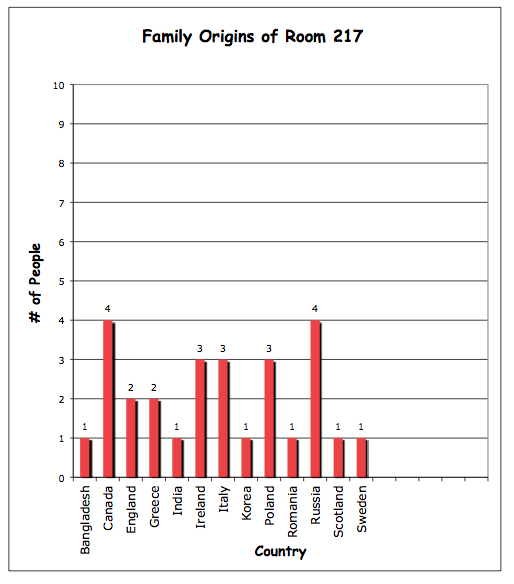
You have been gathering information about your family’s cultural heritage and today we will use Excel to graph the class families countries of origin.

Today we will use The Graph Club to create a table, bar, and circle graph of the favorite sports data that you collected in class. Be sure to add three interpretations of the graph.
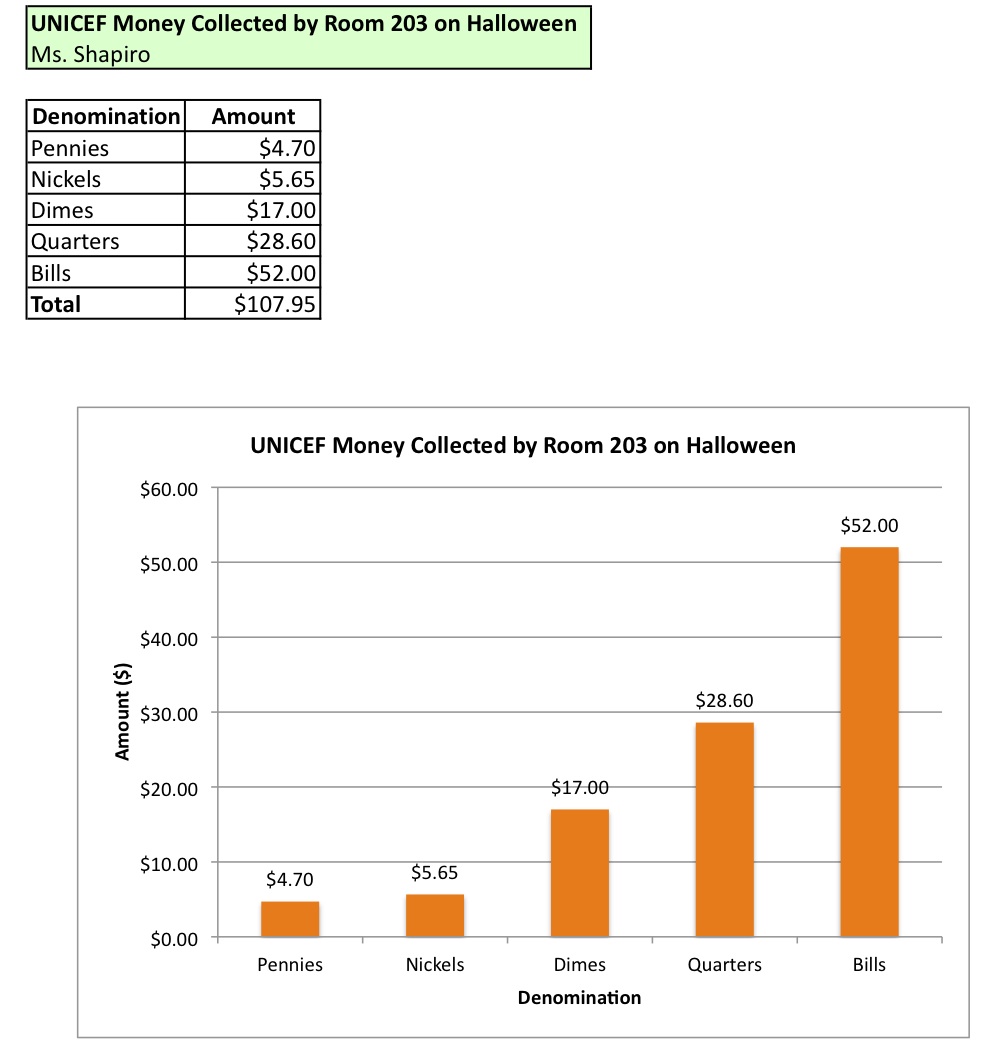
Today we will learn how to use Excel to organize numbers and graph results. You will take the results of your Halloween UNICEF collection create a spreadsheet, formatting it to make it easy to read. Also we will learn how to obtain a sum of numbers. Finally we will create a column graph.
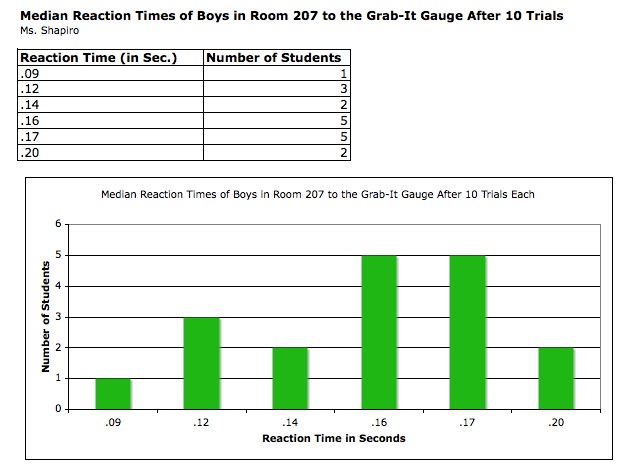
Today you will learn how to use Excel to create a bar graph of your Everyday Math reaction time data. We will also learn how to calculate the mean, median and mode for your data.

Today we will learn how to use Microsoft Excel to graph your survey data. We will create a table, bar, and circle graph.
You have just begun your Math Unit on Graphing, so let’s take your data on favorite snacks and learn how to use Microsoft Excel to graph the data. We will format the spreadsheet and create a column and pie chart.

We will use The Graph Club to create a table, bar graph, and circle graph of your survey results for the class’ favorite seasons. Include at least two interpretations of the graph in the notes area.

Visit these sites to learn about the four seasons.
Today you will graph, in Excel, the results of the class survey on favorite book genres. You will learn how to enter the data and format the spreadsheet. You will also learn how to generate a total using a function. Finally we will examine how to create and format the graph.

Today you will graph the results of your favorite candy survey in Excel. You will learn how to set up a spreadsheet, format it, and perform a simple calculation. Next, you’ll learn how to create a column graph from the data. Finally, you will add an interpretation of the graph.

Today you will take your Everyday Math data from the Grab-It Gauge Reaction Time experiment and put the results into an Excel worksheet. You will learn how to format the cells in the spreadsheet changing size, number type, and borders. Next create a bar graph from the data, formatting the titles, and legend. Remove the plot area of the graph and change the color of the bars.
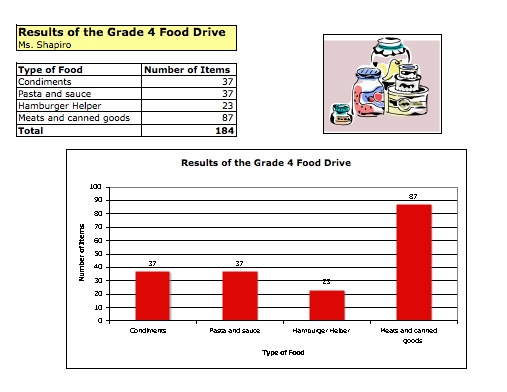
Today we will learn how to use Excel to graph the results of the grade 4 food drive. First we’ll learn how to set up the spreadsheet, format the cells, and then create a bar graph of the results.
We will learn how to use Excel to create a spreadsheet and a bar and circle graph of the survey on after-school snacks. We will also learn how to use the Sum Function and how to format the spreadsheet and graphs.

We will use The Graph Club to create a table, bar graph, and circle graph of your survey results for the class’ favorite seasons. Include at least two interpretations of the graph in the notes area.
Visit these sites to learn about the four seasons.
Today you will use Google Earth to travel the globe in search of weather information for the five different cities below, plus one additional city of your choice. Record the information while you are retrieving it on the Excel spreadsheet template. Use the F3 key to toggle between windows. After all the information is collected, you will learn how to create a bar graph of the temperatures of the cities.

Today we will use The Graph Club to create a bar and circle graph of the class survey about favorite fruits. Add at least two interpretations of the graph in the notes section.


